Compass Launch (v1.12.0)
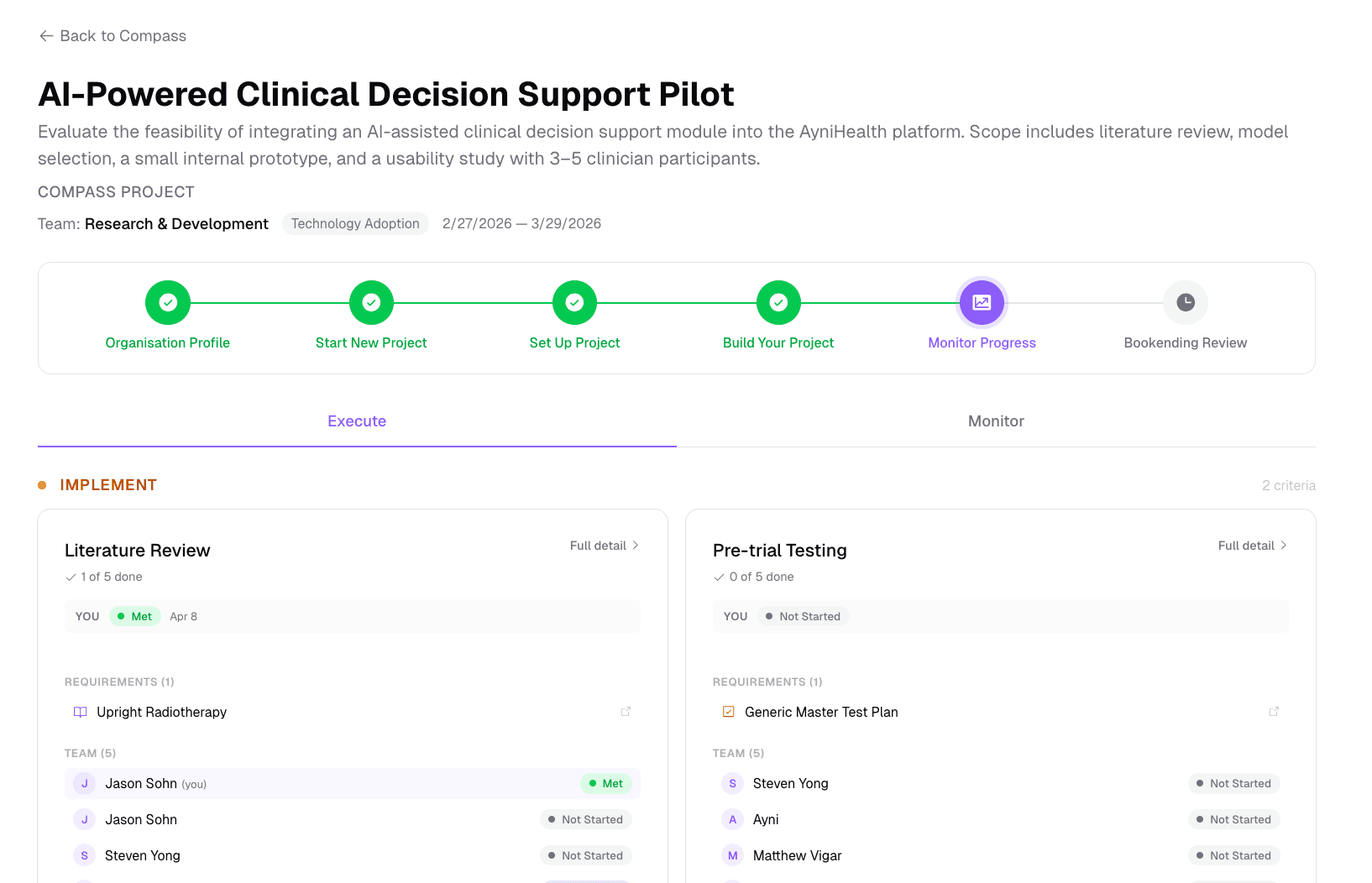
This release is the one we've been building toward all year: Compass is fully launched. What started as a survey-driven recommender is now a complete healthcare project management framework — six structured steps from alignment through sustainment, backed by criteria-based accountability, Goal and ROI tracking, AI-powered reviews, and a live execution dashboard the whole team uses every day.
There's plenty of other work in this release too — a public REST API, a hosted MCP server, organisation subscriptions, real-time Catalyst editing, and lots of polish — but Compass is the headline. Everything else is in the “Beyond Compass” section below.
Compass
The full six-step framework
Compass now walks a project end-to-end through six steps grouped into the Align → Implement → Sustain phases:
- Org Profile (Align) — establish organisational context
- Start New Project (Align) — name the initiative and assemble the team
- Initiation Survey (Align) — define Goals with baseline values, targets, and direction
- Set Up Project (Implement) — record risks, ROI items, and project Goals
- Build Your Project (Implement) — bundle Connect challenges and Catalyst task lists into Criteria with phase assignment and required/optional marking
- Monitor & Execute (Implement) — live execution dashboard plus the analytics view (more below)
- Bookending Review (Sustain) — AI-powered outcomes analysis comparing Goals against targets, with strengths, improvement areas, and sustainability recommendations
Step validation and gate enforcement keep projects from skipping ahead without prerequisites (e.g. at least one Goal before Build, at least one resource before Monitor), and a step transition history records the audit trail.
Execute / Monitor tabs
The Monitor step is now split into two tabs:
- The default Execute tab is the at-a-glance “doing” dashboard for everyone on the project — members, champions, and admins. Each Criterion is expanded inline grouped by phase, showing the deadline, your own status highlighted at the top, the requirements as click-through links straight to the underlying Connect challenge or Catalyst list, and the team roster with each member’s status. Shared Catalysts get their own section.
- The Monitor tab keeps the heavyweight analytics view — Goals, milestones, risks, ROI, and the criteria-tracking grid — and now only fetches its data on first activation, so opening the step no longer triggers the project analytics queries unless someone actually needs them.
Project access gating
Projects still in the pre-monitoring setup phase are now greyed out for regular team members on the Compass page, with an explanatory overlay. Direct visits to a setup-phase project show a friendly modal pointing them back to Compass. Champions, project owners, and organisation admins are unaffected — those steps belong to them.
ROI Register
A new ROI Register sits alongside the Risk Register for tracking expected and realised value from healthcare improvement initiatives:
- Add qualitative benefits (name, category, status, confidence, timeline) without any financial data required
- Optionally enable monetary tracking per item with projected/actual cost and benefit fields, calculated ROI percentage
- 9 healthcare-relevant categories: Cost Savings, Revenue, Efficiency, Quality, Safety, Compliance, Satisfaction, Strategic, Other
- Status lifecycle: Projected → Tracking → Realised / Not Realised / Deferred
- Link ROI items to project Goals and risks for traceability
- CSV import with preview/validation, and CSV export for finance team reporting
- ROI Analysis section in the AI-generated Bookend Review with financial summary and qualitative highlights
- Per-project currency setting (default AUD) and configurable visibility (everyone / financials admin-only / admin-only)
- ROI templates auto-populated when creating projects from blueprints
Criteria — accountability that powers Compass
Criteria are how Compass holds the team accountable: a deadline-bound bundle of Connect challenges and Catalyst task lists assigned to specific members. This release reworked them substantially:
- Live status reconciliation — challenge completion is now derived live from
completed_atinstead of stored separately, eliminating contradictory UI states - Completion cutoff dates — admins choose how recent a challenge completion must be to count (3 months, 6 months, 1 year, 2 years, or any time). Prior completions within the window are auto-credited when creating a Criterion
- Prior completions banner — a green info banner shows which members have already completed the selected challenges and will be auto-credited
- Per-item waivers — admins can waive individual requirements for specific members with a recorded reason, without waiving the entire Criterion
- Recurring Criteria — auto-renew on a configurable interval (e.g. 30, 90, 365 days). Each cycle gets a fresh deadline, members must re-complete requirements, and task lists are cloned fresh each cycle. Admins can force-complete a cycle and a new one will be created
- “Required by” banner on challenge pages — members see which Criterion requires a challenge and its deadline, or a “Credited for” confirmation if already satisfied
- Criterion detail matrix — redesigned as a members × requirements grid with area-filling status badges, hover-to-reveal waive actions, sticky Member and Total Status columns, and horizontal scrolling for requirements. Used as a shared component across all Criterion views
- Batched progress queries — Criterion progress now loads in ~8 database queries regardless of member count (down from N×M)
- Accurate in-progress detection — members who’ve started but not finished a challenge or task list now correctly show as “In Progress” instead of “Not Started”
- In-context explanations — first-time users now learn what a Criterion is via organic help text on assigned challenge views, the Catalyst page, the criterion creation modals, the Compass Build step, the inline Assign confirmation, and more
- Simplified model — Criteria now only support individual task lists. Collaborative task lists belong in Compass projects as shared Catalysts
Compass-linked resources are visually distinct everywhere
Task lists and challenges that belong to a Compass project now show a green “Compass: <project name>” badge wherever they appear — the Catalyst page (in-progress, completed, and team-shared sections), the Catalyst detail header, Connect’s Continue Learning and Assigned to You sections, the Connect Challenges tab, the criterion banner on challenge detail pages, and both the organisation and platform admin Challenges lists. Per-member task list copies created via a Criterion attached to a Compass project now show the same badge — previously only directly-shared lists were distinguished. The delete button on Compass-linked Catalysts is replaced with a “Manage in Compass” link so they can only be removed from the originating project, and every badge is clickable and routes back to the project.
UI and workflow polish
- Compass step UI overhaul — refreshed every step for a cleaner, more consistent feel: each step is a stack of separate cards (no card-within-card), redundant in-step h3 titles were removed in favour of the workflow bar, decorative icons were stripped from card titles, the Project Basics and Team cards in Start New Project are side-by-side and equal-height with per-field inline editing, empty lists show a “ghost” Add button, and every step has a prominent bottom Continue button that pre-validates so users see what’s missing before they try to advance.
- Automatic organisation creation — users who complete the Compass survey as a hospital or industry partner now get their organisation created automatically with 3 months of free subscription credit, and are redirected straight to their new organisation dashboard.
- Shared task lists in Compass projects — the Build step now has a dedicated section for adding collaborative task lists alongside criteria, with template search and one-click cloning.
Beyond Compass
Public REST API and MCP server
AyniHealth now exposes a public REST API and a hosted MCP server so AI agents can interact with the platform programmatically:
- Public REST API (
/api/v1/*) covering content, challenges, Catalyst, Compass, organisations, and user profile, with API key authentication and 60 req/min rate limiting - OpenAPI 3.1 specification at
/api/v1/openapi.jsonand interactive API documentation at/api-docspowered by Redoc - CORS support for cross-origin API consumers
- MCP server package (
ayni-health-mcp) for local installation with Claude Desktop or Claude Code - Remote MCP endpoint (
/api/mcp) — hosted MCP server so users can connect AI agents with just a URL and API key, no local installation - The API Keys tab in the user profile is now an AI Integration hub with step-by-step setup instructions for both Claude Desktop and Claude Code
Organisation subscriptions
Enterprise organisations now have month-based subscription tracking via an append-only credit/debit ledger, with on-demand monthly debits, soft-lock enforcement when expired, platform admin credit management with multi-select bulk actions, and subscription ledger visibility for org owners.
Org dashboard: Member Progress matrix
The organisation dashboard now shows a full spreadsheet-style grid of members vs. criteria with colour-coded status cells, hover tooltips that read as natural sentences (e.g. “Sarah hasn’t started Onboarding Criterion”), and a sticky member column for horizontal scrolling. Filter by team or status, sort by overdue / name / completion, hide fully-met criteria, and export the currently visible filtered view as a UTF-8 CSV.
Real-time Catalyst, smart suggestions, and the rest
- Real-time collaborative editing in Catalyst — tasks created, updated, or deleted by other users now appear live without refreshing, with a brief purple highlight animation on new tasks
- Task assignment for shared Catalyst lists — assign tasks to specific team members on shared or project-linked lists. Assigned users see them in a new “My Assigned Tasks” section on the Catalyst dashboard
- Smart suggestions for repeated form fields — the Risk Register remembers previously entered risk names and mitigation plans, showing them as quick-select pills. The Content Owner field in Connect uses the same system. Suggestions are scoped per organisation
- Localised date formatting — all dates throughout the app now use the browser’s locale settings via the Intl API
- Standardised hover tooltips across criterion status badges and the criterion-tracking matrix
- Team switcher dropdown in breadcrumbs for quickly navigating between teams within an organisation
- Cover image is now automatically copied when creating a challenge from an existing one
Removed
- Broken MCP tools
assign_challenge,delete_challenge_assignment, andlist_challenge_assignments— leftovers from the pre-Criterion era that called REST routes that no longer exist. Use the Criterion MCP tools (create_criterion,add_criterion_item,add_criterion_members,activate_criterion) instead
Fixed
- Deleting a challenge via the public API now correctly blocks deletion when the challenge is referenced by a Criterion attached to an active Compass project
- Compass Build Your Project: replaced the star icon for required/optional marking with an animated pill toggle, and completed projects are now hidden under a foldout on the Compass page
- Redesigned team cards in Teams & Projects: unified champions and members display with inline pills, green gradient accent, searchable member modals, and hover-to-reveal action buttons
- Consolidated all team management into the organisation dashboard; removed the standalone Team Management page
- Password reset emails not delivered when user entered email with different capitalisation — all email inputs are now normalised to lowercase
- Team-scoped content was invisible to team members due to unpopulated team IDs in visibility filter
- PocketBase filter injection vulnerability: migrated all services to use the
buildFilter()utility - Services that silently returned empty arrays on error now properly propagate errors
Security
- API key authentication with scoped permissions and rate limiting (60 req/min)
- Filter injection prevention across all PocketBase service methods
AyniHealth Connect is free to join. Get started at www.ayni.health.